
Whether you’re a seasoned software developer, a QA specialist, or a tech enthusiast building a workstation for development in 2026, having the right gadgets can make all the difference. This checklist is designed to guide you through essential tools and accessories that enhance productivity, comfort, and efficiency. Each section highlights key features to consider and top picks to help you make informed decisions.

Get business pricing on monitors, keyboards and dev gear
- Business-only prices and quantity discounts
- Tax-exempt purchasing
- Multiple users, one account, clear invoices
Organized by device category, this guide provides detailed insights into what makes a great development setup. Use this checklist as a reference point when upgrading your gear or assembling a new workspace. Remember, the best tools align with your specific work style and project needs, so prioritize features that support your workflow.
To get started, review each section carefully, noting the recommended look-for points. When making your selections, consider compatibility, size, and performance to ensure seamless integration into your setup. Happy shopping and building your ideal development environment!
Development Laptops
A high-performance laptop is the backbone of any development workspace, especially when it comes to AI and machine learning tasks. The NIMO 17.3 AI Laptop with AMD Ryzen AI 9 HX 370 is designed to handle demanding workloads with ease, thanks to its powerful processor and ample memory. When choosing a development laptop, focus on processor speed, RAM capacity, and storage options. A machine with at least 16GB of RAM is recommended, but 64GB is ideal for intensive multitasking and large projects. Storage should be fast and spacious—look for SSDs that offer quick data access and ample room for your code, datasets, and virtual environments.
Common mistakes include underestimating required specs or choosing a device that isn’t compatible with your preferred development tools. Pay attention to port availability for peripherals, and ensure the device has a robust cooling system to prevent overheating during extended coding sessions. Consider the display size and resolution to reduce eye strain, especially for long hours of work. Compatibility with external monitors and accessories is also critical for a seamless workflow.
What to look for:
- Powerful processor (e.g., AMD Ryzen 9 or equivalent)
- Ample RAM (at least 16GB, preferably 64GB)
- Fast SSD storage (minimum 1TB recommended)
- Multiple USB-C and Thunderbolt ports
- High-resolution display (4K or better)
NIMO 17.3" AI Laptop with AMD Ryzen AI 9 HX 370, 64GB RAM, 4TB SSD
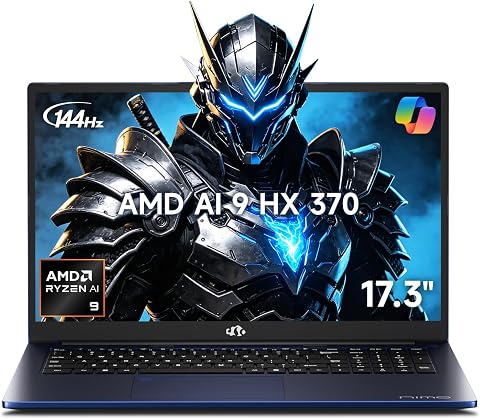
This high-performance 17.3-inch AI laptop features an AMD Ryzen AI 9 HX 370 processor, Radeon 890M graphics, and 64GB RAM, making it suitable for multitasking, gaming, creative workloads, and video editing. It offers a 144Hz display, dual M.2 PCIe 4.0 SSD slots, and a large Full HD screen for enhanced productivity and entertainment.
Pros:
- Powerful AMD Ryzen AI 9 processor with AI capabilities
- High-quality 17.3-inch FHD display with 144Hz refresh rate
- Ample 64GB RAM and 4TB SSD for extensive multitasking and storage
- Integrated Radeon 890M graphics suitable for gaming and creative work
Cons:
- Likely expensive due to high-end specs
- Potentially heavy and less portable because of size and hardware
- No mention of battery life or thermal management
Best for: AI and machine learning projects
Not ideal for: Casual or light coding tasks
Bottom line: A powerful, reliable laptop boosts productivity.
Testing Devices
While specific testing devices aren’t highlighted here, it’s essential to have a variety of hardware for comprehensive QA processes. Testing across different platforms, devices, and configurations ensures your software performs reliably for all users. Consider devices that are representative of your target audience’s hardware, including mobile, desktop, and tablet options. Compatibility with your testing tools and ease of use are key factors to evaluate.
Investing in versatile testing hardware can prevent overlooked bugs and performance issues. Keep in mind that testing devices should complement your development environment, not hinder it. Regularly update and maintain your testing hardware to keep pace with evolving software requirements and device standards.
What to look for:
- Compatibility with your testing tools
- Representation of target user hardware
- Ease of setup and use
- Durability and reliability
- Support for multiple OS environments
Coding Keyboards
The right keyboard can significantly improve your coding efficiency and comfort. The Logitech MX Mechanical Wireless Illuminated Performance Keyboard offers a perfect blend of responsiveness, durability, and style. Look for keyboards with mechanical switches that match your typing preferences, whether tactile or linear. Wireless connectivity reduces desk clutter and enhances flexibility, making it easier to switch between devices.
Common mistakes include choosing a keyboard without considering key layout or compatibility with your operating system. Ensure the keyboard has programmable keys or shortcuts to streamline your workflow. Backlit keys are beneficial in low-light environments, but verify that the lighting is adjustable to prevent eye strain. Compatibility with your OS (Windows, macOS, Linux) is crucial for seamless operation.
What to look for:
- Mechanical switches (tactile, linear, or clicky)
- Wireless connectivity (Bluetooth or proprietary)
- Programmable shortcut keys
- Backlit or adjustable lighting
- Compatibility with your OS
Logitech MX Mechanical Wireless Illuminated Performance Keyboard

The Logitech MX Mechanical is a full-size wireless keyboard featuring low-profile mechanical switches with tactile feedback and smart backlit illumination that adjusts automatically. It supports multi-device pairing via Bluetooth or Logi Bolt receiver, offers customizable keys, and has a rechargeable battery for extended use.
Pros:
- Tactile, clicky mechanical keys with satisfying feedback
- Smart backlit keys that automatically adjust to lighting conditions
- Supports multi-device pairing with easy switching
- Ergonomic full-size layout for comfortable typing
Cons:
- Requires software for full customization, which may be inconvenient for some
- Battery life varies with usage and lighting settings
- Not compatible with Logitech Unifying technology
Best for: Coding and long typing sessions
Not ideal for: Budget or casual use
Bottom line: A quality keyboard boosts coding comfort and speed.
Development Monitors
An ultrawide monitor like the LG UltraFine evo 40U990A can transform your development experience by offering expansive screen real estate. With a 40-inch 5K2K curved display, you’ll have ample space for coding, debugging, and previewing designs simultaneously. When selecting a monitor, prioritize resolution, color accuracy, and curvature to reduce eye strain and improve productivity.
Common mistakes include choosing monitors with insufficient resolution or poor color accuracy, which can cause eye fatigue or misinterpretations of visual data. Ensure the monitor supports your workstation’s graphics capabilities and has adjustable stands for ergonomic positioning. Compatibility with multiple input types (HDMI, DisplayPort, USB-C) is also important for flexible connectivity. Consider the curvature and size to match your workspace and personal comfort preferences.
What to look for:
- High resolution (5K or higher)
- Wide screen (40-inch or larger)
- Color accuracy (covering sRGB, AdobeRGB)
- Multiple input options
- Adjustable stand for ergonomic setup
LG UltraFine evo 40U990A 40-inch 5K2K Curved Ultrawide Monitor

The LG UltraFine 40U990A is a 40-inch curved ultrawide monitor with 5K2K resolution, Nano IPS Black panel, and HDR 600 certification. It offers extensive connectivity options, including Thunderbolt 5, HDMI 2.1, and DisplayPort 2.1, making it ideal for creative professionals and multitaskers.
Pros:
- Expansive 40-inch curved ultrawide display ideal for multitasking and creative work
- High-resolution 5K2K with excellent color accuracy and HDR support
- Advanced connectivity including Thunderbolt 5 and multiple ports for versatile setups
- Built-in speakers and ergonomic adjustments enhance user experience
Cons:
- Premium price may be a barrier for some users
- Large size requires ample desk space
- Complex connectivity options might be overwhelming for casual users
Best for: Extended coding and design work
Not ideal for: Limited desk space
Bottom line: An ultrawide monitor enhances multitasking and comfort.
Wireless Accessories
The Logitech Lift Vertical Ergonomic Wireless Mouse in Graphite is designed to reduce strain during long coding sessions. Its ergonomic shape encourages a natural hand position, minimizing fatigue and discomfort. When choosing wireless accessories, consider ergonomics, battery life, and connectivity options. A good ergonomic mouse can prevent repetitive strain injuries, especially for developers who spend hours at their desk.
Common mistakes include opting for a mouse that doesn’t fit your hand or lacks sufficient battery life, leading to inconvenience. Look for features like adjustable DPI settings for precise control and customizable buttons for shortcuts. Compatibility with your operating system and seamless Bluetooth or wireless connection are also vital. Ergonomic accessories are an investment in your comfort and productivity, so choose those designed for extended use.
What to look for:
- Ergonomic shape and design
- Adjustable DPI settings
- Long battery life
- Seamless wireless connectivity
- Compatibility with your OS
Logitech Lift Vertical Ergonomic Wireless Mouse – Graphite
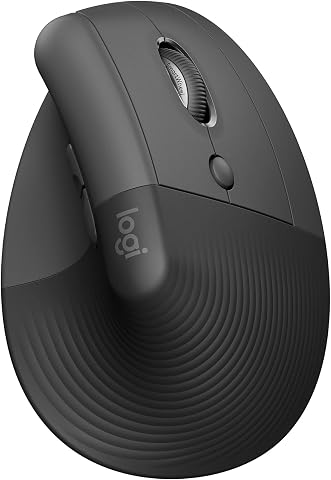
The Logitech Lift Vertical Ergonomic Wireless Mouse offers a comfortable, upright design to promote natural wrist and forearm posture. It features customizable buttons, quiet clicks, and seamless scrolling, suitable for long hours of use across multiple operating systems.
Pros:
- Ergonomic vertical design reduces wrist strain
- Long battery life of up to 2 years
- Compatible with multiple operating systems including Windows, macOS, and Linux
- Quiet clicking and customizable buttons
Cons:
- Design may not suit users preferring traditional mice
- Limited color options outside of recycled plastic variants
Best for: Long coding and debugging sessions
Not ideal for: Casual or short-term use
Bottom line: An ergonomic mouse improves comfort and efficiency.
Cloud Storage Devices
For developers and QA teams, portable SSDs like the Samsung T7 Shield 2TB are essential for fast, reliable storage. With USB 3.2 Gen 2 and transfer speeds up to 1,050 MB/s, this device ensures quick backups, data transfers, and access to large datasets. When choosing a cloud storage device, prioritize speed, durability, and compatibility with your systems.
Common mistakes include selecting storage with insufficient speed or durability for frequent travel and heavy use. Look for rugged, shock-resistant designs and compatibility with multiple operating systems. Capacity should align with your project needs, whether for storing code, datasets, or virtual machine images. Having a portable, high-speed SSD streamlines your workflow and safeguards your data.
What to look for:
- High transfer speeds (over 1,000 MB/s)
- Durable and rugged design
- Compatibility with Windows, macOS, Linux
- Capacity suited to project needs
- USB-C connectivity
Samsung T7 Shield Portable SSD 2TB, USB 3.2 Gen 2, Up to 1,050 MB/s

The Samsung T7 Shield Portable SSD offers high-speed data transfer with read/write speeds up to 1,050/1,000 MB/s. It features rugged durability with water, dust, and drop resistance, making it ideal for on-the-go use across various devices and environments.
Pros:
- High-speed data transfer up to 1,050 MB/s
- Rugged design with water, dust, and drop resistance
- Compatible with multiple devices including PC, Mac, Android, and gaming consoles
- Supports iPhone 15 Pro Res 4K video
Cons:
- Performance may vary depending on host device and connection cables
- Water and dust resistance tested under controlled conditions, real-world performance may differ
Best for: Fast data transfer and backups
Not ideal for: Limited storage capacity
Bottom line: A reliable portable SSD keeps your data accessible and safe.