
TL;DR
Building your own AI workstation was cheaper in the past, but in 2026, prebuilt options often match or beat DIY on price, speed, and reliability. Your choice hinges on control, workflow, and how fast you need results.
Imagine pulling a lever and suddenly your AI work just flows—smooth, silent, cool. Now, ask: do you want to pull those levers yourself or have someone else do it for you? That’s the core of the build vs. buy debate, but in 2026, it’s no longer just about saving a few bucks or quick setup.
Today’s decision is about workflow, control, and speed. Whether you’re training models, running inference, or generating content, your choice shapes your project’s pace and your operational flexibility. Ready to get specific about which route fits your goals? Let’s break down what matters most now.
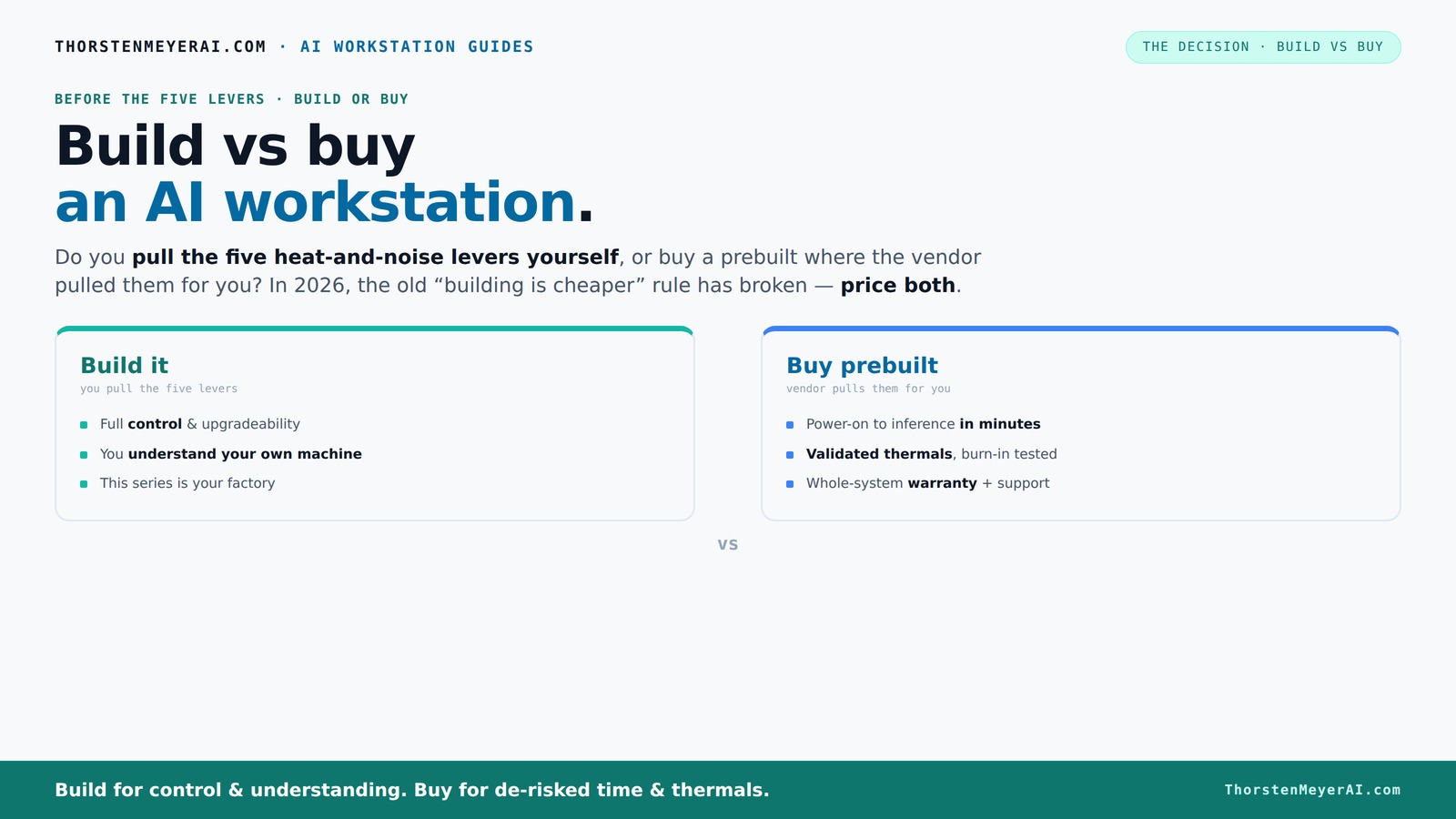
Build vs buy
an AI workstation.
The real question behind this whole series: do you pull the five heat-and-noise levers yourself, or buy a prebuilt where the vendor pulled them for you? And in 2026, the old “building is cheaper” rule has broken. Match your situation in Part 3.
Key Takeaways
- In 2026, component shortages have leveled the cost playing field—prebuilts often match DIY builds on price.
- Control over thermal management is key—buy a system that’s already validated or be ready to tune and test yourself.
- Performance depends on matching your workload; prebuilt systems are often validated for heavy AI tasks, saving you headaches.
- Support and warranties reduce risk—prebuilts come with expert support, vital for mission-critical projects.
- Hybrid approaches let you deploy fast and still customize—buy the base, then tweak for your specific needs.

HELLOLAND Ocean of Stars AI Gaming PC Desktop - RTX 5070 12GB - AMD Ryzen 7 9700X- 16GB DDR5 RAM- 1TB PCIe +2TB SATA SSD- 850W PSU- WiFi + BT- Windows 11 -RGB Lights with Software Control - White
- Powerful Ryzen 7 Processor: 8 cores, up to 5.5GHz for multitasking
- High-Performance RTX 5070 GPU: 12GB VRAM, 4K-ready graphics
- Fast DDR5 RAM: 16GB for smooth multitasking
As an affiliate, we earn on qualifying purchases.
As an affiliate, we earn on qualifying purchases.
Why Building Your Own AI Workstation No Longer Always Cheaper in 2026
Building a custom AI rig used to be a no-brainer for saving money. Not anymore. Component shortages and bulk buying have driven prices up—DDR5 RAM, high-end GPUs, and SSDs now cost 20–30% more than just two years ago. That means a build that cost $1,000 in 2024 can now easily top $1,250 or more.
For example, a popular GPU like the NVIDIA RTX 4090 used to be around $1,200; today, it's often selling for $1,600 or higher, depending on supply. Meanwhile, prebuilt manufacturers—like Lambda or Puget—bought these parts wholesale before prices spiked, allowing them to offer systems at prices that are tough for DIY builders to match. This shift means you need to do the math carefully. A DIY build might seem cheaper initially, but when you add in the costs of OS, cooling, assembly, and troubleshooting, the total expense can tilt in favor of prebuilt options.
Furthermore, the time investment required for sourcing parts, testing, and tuning a DIY system can be substantial. This time cost isn’t just about money—it impacts your project timeline. If you need a system up and running quickly, prebuilt systems often deliver better value because they come pre-validated, saving you hours or days of setup and testing. The implication? The traditional cost advantage of building your own system has diminished, making the decision more nuanced and dependent on your specific needs for control versus convenience.
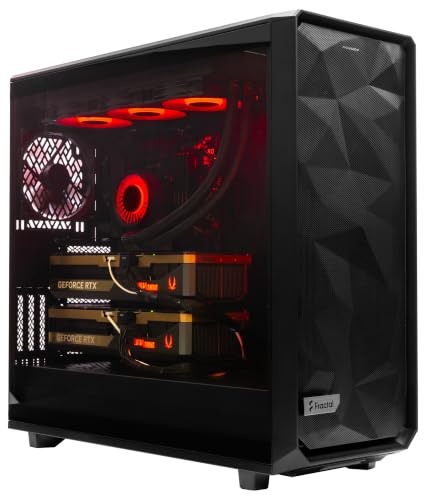
ArsenalPC MES2X Dual GPU AI Workstation - AMD Ryzen 9-9950X3D2 16 core 4.3GHz - Dual GPU GeForce RTX 5090-8TB (2x4TB RAID) NVMe SSD - 256GB DDR5-1600W - Windows 11 Pro - Liquid Cooled
- Processor: AMD Ryzen 9-9950X3D2 16-core 4.3GHz
- Memory: 256GB DDR5 RAM
- Graphics: Dual NVIDIA GeForce RTX 5090 64GB
As an affiliate, we earn on qualifying purchases.
As an affiliate, we earn on qualifying purchases.
Who Pulls the Levers? The Real Heat and Noise Control Battle
Controlling heat and noise is essential for maintaining performance and prolonging component lifespan in an AI workstation. When you build, you have the flexibility to select cooling solutions—air, liquid, or hybrid—and fine-tune fan curves and airflow paths. This level of control allows you to optimize for silence or maximum thermal performance based on your environment and workload. For example, a custom water-cooling loop can keep temperatures low under sustained loads, enabling higher clock speeds and better GPU longevity, but it requires expertise and ongoing maintenance.
Buying a prebuilt shifts this control to the manufacturer. Reputable vendors like Lambda or Puget invest heavily in thermal testing, noise reduction, and component placement to ensure systems run cool and quiet. They often incorporate advanced cooling technologies—such as custom water loops or high-quality fans—and validate these configurations through extensive stress testing. This validation is critical because thermal issues can throttle performance or cause hardware failures, especially in continuous AI training scenarios. The tradeoff is that you relinquish some control, but gain reliability, lower noise, and less hassle. The key is understanding your priorities: is it optimal thermal management tailored to your needs, or convenience and consistent performance without the need for tuning?

High-Performance Gaming Desktop PC – Ryzen 7 5700X, GeForce RTX 3050 8GB
- High-Performance CPU: Ryzen 7 5700X with 8 cores
- Ample Memory: 16GB DDR4 RAM for multitasking
- Powerful Graphics: GeForce RTX 3050 8GB GDDR6
As an affiliate, we earn on qualifying purchases.
As an affiliate, we earn on qualifying purchases.
Performance Fit: Will Your System Handle Your AI Workloads?
Performance is king in AI workloads. Whether you’re training massive models or running inference at scale, your system’s GPU VRAM, memory bandwidth, and cooling efficiency directly impact your productivity and cost-efficiency. Building allows for precise customization—choosing a GPU with the exact VRAM needed, pairing it with high-speed RAM, and designing airflow to sustain high loads without thermal throttling. This tailored approach can maximize performance for specific tasks but requires deep knowledge and testing to get right.
Prebuilt systems designed for AI, like those from Lambda or Puget, are extensively validated for these workloads. They undergo rigorous stress testing—sometimes 48 hours or more—to ensure thermal stability, consistent clock speeds, and no performance bottlenecks. This validation reduces the risk of unexpected thermal throttling during long training runs or continuous inference, which can significantly affect results and operational costs. For instance, attempting to run a 12-billion-parameter model on a DIY rig with only 16 GB VRAM might lead to frequent out-of-memory errors or thermal shutdowns, halting your work. Conversely, a prebuilt with 48 GB VRAM and optimized cooling can sustain heavy workloads reliably, reducing downtime and ensuring steady progress. The implication? Your choice impacts not just raw performance but also the predictability and stability of your AI operations.

NOVATECH AI Workstation Desktop PC – Intel Core i9-14900K, Liquid Cooling – Machine Learning, Data Science, 3D Rendering, Video Editing, Simulation (RTX 5090 | 96GB RAM | 5TB)
- High-Performance CPU: Intel Core i9-14900K processor
- Powerful GPU: NVIDIA RTX 5090 with 32GB VRAM
- Ample RAM: 96GB DDR5 6000MHz memory
As an affiliate, we earn on qualifying purchases.
As an affiliate, we earn on qualifying purchases.
Support, Warranty, and Peace of Mind
When your AI project is mission-critical, support and warranty coverage become vital. Building your own system may save money upfront but can lead to longer downtimes if hardware fails or software issues arise. Troubleshooting BIOS settings, driver conflicts, or thermal problems can be time-consuming and frustrating, especially if you lack experience or dedicated support resources. Without a warranty, you’re responsible for repairs, replacements, and diagnostics, which can delay your project.
Prebuilt vendors like Lambda or Puget provide extensive testing, often running systems under load for days before shipping, and offer warranties up to 5 years. They also provide dedicated support channels—help desks, on-site repairs, and rapid replacements—that can get your system back online quickly if issues occur. This support reduces operational risk, especially for high-stakes AI workflows where downtime translates directly into lost productivity or revenue. For example, a research team relying on continuous inference might find that the peace of mind from a vendor-backed system outweighs the initial cost premium, ensuring minimal disruption and faster problem resolution. The tradeoff is clear: support and warranty can be the difference between a smooth project and costly interruptions, emphasizing their importance in mission-critical AI deployments.
Upgrade Paths: Can You Keep Up with Future AI Demands?
Future-proofing your AI workstation often hinges on upgradeability. Custom builds tend to excel here because they’re designed with flexibility in mind. You can choose motherboards with multiple PCIe slots, large cases for additional cooling, and power supplies that support future GPU upgrades. This modularity means you can swap out GPUs, add more RAM, or upgrade storage as your needs evolve, often at a lower cost than replacing entire systems. For instance, a builder might start with a mid-range GPU and upgrade to a top-tier model over time, scaling performance without a total rebuild.
Prebuilt systems, however, often come with constraints—limited space inside the chassis, proprietary components, or BIOS limitations—that restrict future upgrades. Some models might only support certain GPU sizes or have limited PCIe slots, forcing you to buy a new system when your performance needs outgrow the current one. This can lead to higher long-term costs and less flexibility. If you anticipate expanding or upgrading your AI infrastructure over several years, a well-planned modular build can save thousands and reduce waste. But if you need an immediate, ready-to-run system and don’t plan future upgrades, a prebuilt might suffice, even if it sacrifices some flexibility later. The key is understanding your projected growth and choosing accordingly.
Security and Data Control: Who Owns the Stack?
Security and data control are paramount in sensitive AI applications, especially in regulated industries like healthcare or finance. Building your own system gives you full ownership over hardware, software, and data storage. You can implement strict security measures, control access, and ensure compliance with legal standards—like data residency laws—without relying on third-party vendors. This full control minimizes risks related to data breaches or unauthorized access.
Prebuilt systems, on the other hand, often come with proprietary firmware, cloud-connected management tools, or telemetry features. While these can simplify management, they introduce potential vulnerabilities or dependencies. For example, a prebuilt system with cloud-based monitoring might be vulnerable to network breaches or require trust in the vendor’s security practices. For organizations handling highly sensitive or regulated data, building in-house ensures you can implement tailored security protocols, audit trails, and data handling procedures. The tradeoff is often complexity versus control: more control means more responsibility, but it’s essential for compliance and security in high-stakes environments. Ultimately, your decision should weigh the importance of security and data sovereignty against convenience and vendor support.
Vendor Lock-In: The Hidden Cost of Prebuilts
Purchasing a prebuilt system might seem like the easier route, but it can embed you into a vendor’s ecosystem, limiting your flexibility over time. Proprietary components, BIOS restrictions, and vendor-specific upgrade paths can make future modifications costly or impossible. For example, a prebuilt with a custom motherboard or BIOS may not support newer GPUs or additional drives without significant modifications or a complete replacement.
Building your own system grants you full control over every component—motherboard, CPU, GPU, cooling—and the ability to upgrade or replace parts as needed. This flexibility means you’re less dependent on a single vendor’s roadmap, reducing long-term costs and avoiding obsolescence. It’s akin to owning a custom car—you know every part, and you can modify or repair it with available parts. For organizations that prioritize agility, customization, and long-term cost management, avoiding vendor lock-in is a strategic advantage. The tradeoff is that DIY systems require more effort upfront and technical expertise, but they offer unmatched flexibility and control over your AI infrastructure.
Hybrid Strategy: The Best of Both Worlds?
In 2026, many organizations adopt hybrid approaches—combining prebuilt and custom elements—to optimize deployment speed and control. For example, you might purchase a preconfigured GPU server validated for AI workloads, then customize cooling, storage, or software to suit your specific needs. This approach allows rapid deployment while still providing room for differentiation and upgrades. Such hybrid strategies can reduce initial costs and time-to-market, while giving you the ability to tweak and optimize your setup over time.
For instance, a startup might buy a high-end prebuilt with validated hardware and then add custom cooling or noise reduction solutions, tailoring the system for quieter operation or better thermal performance. This flexibility enables organizations to leverage the benefits of validated, supported systems without sacrificing control or customization. The main advantage is balancing risk and speed—getting a reliable system quickly and then refining it for optimal performance and specific workflows. This approach is particularly appealing for teams that need to scale rapidly but want to retain some control over their infrastructure’s evolution.
Frequently Asked Questions
Is it cheaper to build or buy an AI workstation in 2026?
It depends. Component prices have risen, making prebuilt systems often just as affordable as DIY builds today. Always compare the exact configuration and consider your time and support costs before deciding.Which option offers better performance for local AI workloads?
Both can deliver high performance, but prebuilt systems are often validated under heavy load, reducing your setup time and risk of bottlenecks. Building gives you tailored control, but requires more effort.How much RAM and GPU memory do I really need?
It depends on your workload. For training large models, 48–96 GB RAM and 24–48 GB VRAM are common. For inference or smaller projects, 16–32 GB RAM and 8–12 GB VRAM often suffice. Validate your specific needs before buying or building.Will a prebuilt workstation handle training, inference, or content creation?
Yes, many prebuilt systems designed for AI are tested for these tasks. They often include high-end GPUs with ample VRAM and optimized cooling, reducing setup time and risk of thermal throttling.What are the hidden costs of building one myself?
Time spent sourcing parts, testing thermal management, troubleshooting issues, and maintaining support can add up. Plus, DIY systems may need upgrades sooner, costing more long-term.Conclusion
This isn’t just about dollars—it's about workload, control, and speed. In 2026, the best choice depends on your priorities: do you want a ready-made machine that’s validated and supported, or a custom beast tuned exactly for your needs?
Remember, a well-chosen system can make or break your AI project. Picture your ideal setup—quiet, fast, reliable—and pick the path that gets you there fastest and most confidently.