🔍 Read the full analysis: 8 Monitor Picks For Players Seeking Smooth, Responsive Gameplay on ThorstenMeyerAI.com

Get business pricing on monitors, keyboards and dev gear
- Business-only prices and quantity discounts
- Tax-exempt purchasing
- Multiple users, one account, clear invoices
TL;DR
ThorstenMeyerAI.com’s supplied guide compares eight monitors for players seeking smoother gameplay, spanning 4K at 320Hz, QHD at up to 260Hz, QD-OLED and several 1080p options. The guide’s central caveat is that refresh-rate claims do not guarantee a PC can produce matching frame rates; resolution, screen size and game compatibility matter too.
ThorstenMeyerAI.com has compared eight gaming monitors aimed at players who want smooth, responsive gameplay, from the MSI MAG 272URDFA E16’s 4K, 320Hz combination to more accessible 1080p models. The guide argues that buyers should weigh resolution, panel type and screen format alongside refresh rate, because a monitor’s maximum rate does not mean a computer can deliver matching frames in every game.
ThorstenMeyerAI.com names the MSI MAG 272URDFA E16 its best overall pick for buyers seeking a high-refresh 4K display. The guide describes the pairing of 4K resolution and a 320Hz refresh rate as unusual, but warns that reaching high frame rates at 4K demands a capable graphics card. This is the guide’s buying recommendation, not an independently verified test result included in the supplied material.
For a less demanding resolution, the guide presents the AOC Q27G41ZE as a QHD option with a 240Hz native refresh rate and an overclocked 260Hz mode. It places the Samsung Odyssey OLED G6 in a separate premium category because of its QD-OLED panel, rather than treating it as simply another fast IPS display. The supplied guide does not provide prices or detailed test measurements for either model.
The guide’s other five picks cover lower-resolution and larger-screen formats: the ASUS VG259QM5A and Dell SE2426HG are cited as 24-inch-class 1080p choices; the Sceptre 34-inch ultrawide and 32-inch SANSUI offer larger formats; and the AOC C27G4ZH pairs a 27-inch curved screen with 1080p. The guide says the latter format can appear less crisp at close viewing distances. The supplied text does not give full model specifications for every pick.
The 8 picks
- 1
 Samsung 27" Odyssey OLED G6 (G61SH) QD-OLED Gaming MonitorView on Amazon →
- 2
 msi MAG 272URDFA E16 27-inch 3840 x 2160 (UHD) Gaming Office Monitor, 320Hz,…View on Amazon →
- 3
 Sceptre C345B-QU240T 34-inch Curved Ultrawide Gaming MonitorView on Amazon →
- 4
 SANSUI 32 Inch Curved 240Hz Gaming Monitor High Refresh Rate, FHD 1080PView on Amazon →
- 5
 AOC 27" Gaming Monitor QHD 240Hz Overclocked IPS NVIDIA G‑Sync Q27G41ZEView on Amazon →
- 6
 AOC C27G4ZH 27-Inch Curved FHD Gaming MonitorView on Amazon →
- 7
 ASUS TUF Gaming VG259QM5A 24.5-Inch 1080p 240Hz Gaming MonitorView on Amazon →
- 8
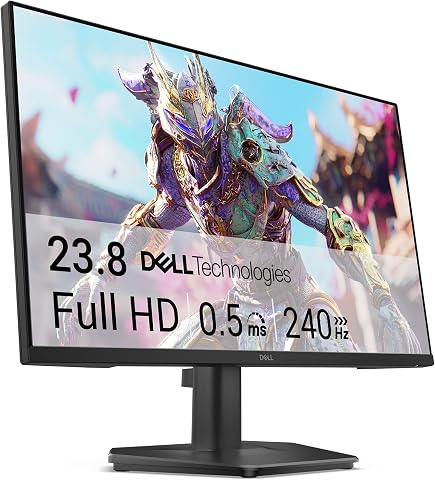 Dell 24 240Hz Gaming Monitor – SE2426HG – 23.8-inch FHD (1920×1080) 240Hz Dis…View on Amazon →
Match Monitor Speed to Your PC
The ThorstenMeyerAI.com guide highlights a practical distinction for buyers: refresh-rate capacity and delivered frame rate are not the same. A monitor can refresh rapidly, but a game and graphics card must produce enough frames to make full use of that rate. At higher resolutions, the GPU has more pixels to render, so the MSI’s 4K-and-320Hz headline may be relevant to a narrower set of systems and games than the number alone suggests.
Resolution and screen size also affect how clear an image looks from a desk. The guide presents a 24-inch-class 1080p display as a possible fit for players prioritizing competitive speed and manageable GPU demands, while QHD offers more detail for a larger desktop without the same rendering load as 4K. It notes that a larger 1080p screen may look less sharp up close. The guide’s value is in comparing these tradeoffs rather than ranking monitors by refresh rate alone.
Popular right now

Hisense 55-Inch E6SR Series 4K UHD Hi-QLED Roku Smart TV (2026 Model)

Sony WH-1000XM6 Wireless Noise-Canceling Headphones, Black

Ninja Foodi 8-Qt DualZone 6-in-1 Air Fryer, Grey (DZ201)
As an affiliate, we earn on qualifying purchases.
Eight Formats, Different Priorities
According to ThorstenMeyerAI.com, its ranking considers how refresh rate, resolution and screen format work together, along with panel type, adaptive-sync support where specified, connectivity and adjustment details. The guide says it does not assume features when product information does not specify them. The supplied material does not include measurements or a detailed testing methodology, so its rankings should be read as editorial recommendations.
The guide also cautions that ultrawide compatibility varies by game: some titles may not support the format well, and interfaces may show borders or stretch. It treats curvature as a viewing preference, not a performance improvement. Buyers are advised to check their main games and seating distance before choosing a large or curved screen.
Specifications and Testing Details
The supplied ThorstenMeyerAI.com guide does not identify a publication date, list prices, or give complete specifications for all eight models. It also does not provide benchmark results showing frame rates, response times, input lag or image quality under controlled conditions. Recommendations and labels such as “best overall” are the guide’s assessments; the material provided does not establish that they represent an independent consensus.
The guide discusses features such as adaptive-sync support as items buyers should check, but does not confirm support for every monitor. It is also unclear which games or graphics cards were used to assess the products, or whether each model’s stated maximum refresh rate requires particular settings or connections. Buyers should verify current specifications and compatibility with the manufacturer before purchase.
Verify Fit Before Buying
ThorstenMeyerAI.com recommends comparing a monitor’s resolution and refresh rate with performance in the games a buyer actually plays, then checking the PC’s ability to sustain suitable frame rates. Buyers considering an overclocked refresh mode, variable refresh features or a high-resolution setup should confirm the required monitor settings, graphics-card support and connection details in official product documentation.
For larger curved or ultrawide screens, the guide’s next checks are desk depth, viewing distance and game support. The supplied material includes no follow-up testing, pricing update or new product announcement, so changes to availability and specifications remain unreported.
Key Questions
Which monitor does the guide rank as its overall pick?
ThorstenMeyerAI.com names the MSI MAG 272URDFA E16, citing its combination of 4K resolution and a 320Hz refresh rate. The guide cautions that driving high frame rates at 4K requires a capable graphics card.
What is the guide’s QHD option?
The AOC Q27G41ZE is described in the supplied guide as a 27-inch QHD speed pick, with a 240Hz native refresh rate and an overclocked 260Hz mode.
Which pick uses QD-OLED?
ThorstenMeyerAI.com identifies the Samsung Odyssey OLED G6 as its QD-OLED option and positions it as a premium panel choice. The provided text does not include comparative image-quality test results.
Are the highest refresh rates useful for every gaming PC?
No. As the guide explains, a monitor’s refresh rate describes how often its display can update; it does not indicate how many frames a PC can render. It advises matching resolution and refresh rate to performance in the games a buyer plays.
What should buyers check before choosing an ultrawide?
The guide advises checking whether the main games support the ultrawide format as intended, since some may show borders or stretch the interface. Desk space and viewing distance also matter for larger screens.
Source: ThorstenMeyerAI.com