
📊 Full opportunity report: How to Reduce Heat and Noise in a High-Power AI Workstation on ThorstenMeyerAI.com — validation score, market gap, and execution plan.

Get monitors, keyboards and dev gear delivered free — and shop member deals
- Fast, free delivery on millions of items
- Access to Prime Big Deal Days deals on October 6–7
- Prime Video, Amazon Music and more included
TL;DR
High-power AI workstations generate significant heat and noise due to continuous GPU load. Key solutions include undervolting GPUs, optimizing airflow, and selecting efficient cooling methods. This helps improve performance and reduce operational noise.
High-power AI workstations produce excessive heat and noise due to sustained GPU loads, making them louder and warmer than typical gaming PCs. This impacts user comfort, hardware longevity, and workspace acoustics. Experts emphasize that understanding the sources of heat and noise is essential to effective mitigation.
Unlike gaming PCs, AI workstations operate under continuous, high-load conditions, especially during long inference tasks, causing GPUs and other components to run at or near maximum capacity for extended periods. This sustained load results in higher thermal output and louder fan noise, often leading to throttling and reduced performance.
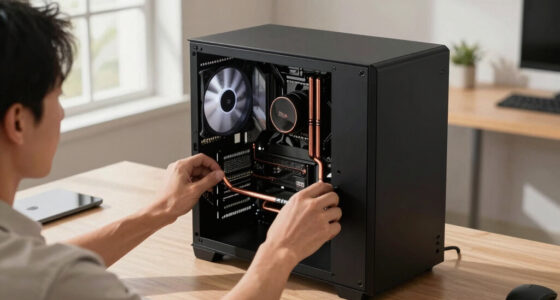
The main sources of heat and noise are the GPU, CPU, power supply, VRMs, and case airflow. The GPU is responsible for over 70% of the thermal load during inference, with its fans being the loudest component under sustained operation. CPU load varies depending on workload, especially during prompt prefill stages, while power supplies and VRMs generate additional heat and noise, especially if undersized or low-quality. Poor case airflow exacerbates these issues by trapping heat and forcing fans to work harder.
Effective mitigation involves multiple strategies. The most impactful is undervolting and capping GPU power limits, which significantly reduces heat and noise with minimal performance loss. Improving case airflow through better ventilation and fan placement is critical. Upgrading to quieter, more efficient cooling solutions—such as high-quality fans or liquid cooling—also plays a vital role. Each approach has its trade-offs and costs, but combined, they can dramatically improve workstation acoustics and thermal performance.
An AI workstation isn’t a gaming PC —
and that’s why it runs hot.
Local inference is a sustained load: the GPU sits near full power for hours with no loading screens, so the heat never dissipates and the fans never get a break. Here’s where the heat comes from — and the five levers that reduce it.
Why Managing Heat and Noise Matters in AI Workstations
Reducing heat and noise in high-power AI workstations enhances user comfort, extends hardware lifespan, and maintains optimal performance during long inference runs. Lower noise levels also improve workspace environment, especially in shared or home offices. Implementing effective cooling strategies can prevent thermal throttling, ensuring consistent throughput and avoiding costly hardware failures.
quiet high-performance GPU cooling fans
As an affiliate, we earn on qualifying purchases.
As an affiliate, we earn on qualifying purchases.
Understanding the Unique Thermal Challenges of AI Workstations
AI workstations differ from gaming PCs because they operate under continuous, sustained loads rather than bursty spikes. This constant high load causes GPUs and other components to stay at high temperatures, with cooling systems working continuously to dissipate heat. Historically, cooling solutions optimized for gaming are insufficient for these workloads, leading to throttling and excessive noise. Recent developments focus on power management techniques like undervolting and improving airflow to address these issues effectively.
“Understanding that AI workloads generate sustained thermal output is key to designing effective cooling solutions.”
— Thorsten Meyer, AI hardware expert
liquid cooling system for AI workstations
As an affiliate, we earn on qualifying purchases.
As an affiliate, we earn on qualifying purchases.
Unresolved Questions About Optimal Cooling Strategies
While undervolting and airflow improvements are proven effective, the optimal cooling configurations for different hardware setups remain variable. The long-term effects of aggressive undervolting on hardware stability are still being studied, and the best liquid cooling solutions versus high-quality air coolers are subject to ongoing comparison and testing. Additionally, the impact of newer GPU architectures on heat and noise profiles is not yet fully understood.
high airflow PC case for AI workstation
As an affiliate, we earn on qualifying purchases.
As an affiliate, we earn on qualifying purchases.
Next Steps for Improving AI Workstation Cooling Efficiency
Future developments will include more refined power management tools integrated into GPU drivers, advanced cooling hardware tailored for continuous high loads, and better case designs optimized for airflow. Hardware manufacturers are expected to release more efficient power delivery systems and quieter cooling solutions. Users should monitor updates from GPU vendors and cooling component manufacturers to adopt emerging best practices.
GPU undervolting tools for NVIDIA RTX 5090
As an affiliate, we earn on qualifying purchases.
As an affiliate, we earn on qualifying purchases.
Key Questions
What is the most cost-effective way to reduce noise in an AI workstation?
The most cost-effective method is undervolting the GPU and improving case airflow with better fans or ventilation. These steps require minimal investment but provide significant noise and heat reductions.
Can upgrading to liquid cooling significantly lower noise levels?
Yes, high-quality liquid cooling can reduce fan noise by allowing fans to run at lower speeds. However, it involves higher initial costs and maintenance considerations.
Is it safe to undervolt my GPU for thermal reduction?
Undervolting is generally safe if done within manufacturer guidelines. It can improve thermal performance without risking hardware stability, but users should follow detailed guides and test for stability.
How much can airflow improvements impact overall noise levels?
Enhancing case airflow can significantly decrease fan speeds needed for cooling, thus lowering noise. Proper fan placement and case design are critical for maximum impact.
Are there specific cooling solutions recommended for multi-GPU setups?
High-performance liquid cooling or specialized multi-GPU coolers are recommended for large, sustained workloads, as they better handle heat dissipation and reduce noise compared to standard air coolers.
Source: ThorstenMeyerAI.com
Halloween Picks
halloween
As an affiliate, we earn on qualifying purchases.