This checklist is for software developers, QA professionals, and others who spend long stretches working at a desk. It focuses on products that can help you shape a workspace around your daily tasks, with comfort and adjustability in mind.

Get business pricing on monitors, keyboards and dev gear
- Business-only prices and quantity discounts
- Tax-exempt purchasing
- Multiple users, one account, clear invoices
The sections cover seating, desk setup, monitor positioning, keyboard choice, mouse guidance, and foot support. Each slot includes a named pick when one was provided; the vertical mouse section offers selection advice only.
Use the checklist to compare each option with your workspace, equipment, and working habits. Check dimensions, adjustment ranges, and connection or mounting requirements against your setup before deciding, and prioritize fit and compatibility over features you will not use.
Ergonomic Office Chair
A chair is the foundation of a desk setup because it supports the posture you return to throughout the workday. The Flysky Ergonomic Mesh Office Chair with Adjustable Headrest and Lumbar names two adjustment areas worth considering: headrest position and lumbar support. The useful question is whether those adjustments can be set to suit your body and desk, rather than whether the chair simply lists them.
A common buying mistake is assuming that an ergonomic label guarantees a good fit. Check the seat height and depth, back support position, armrest range, and whether the chair fits beneath your desk. Compare the listed dimensions with your available floor space and your own seated position. If possible, look for clear adjustment instructions and a return option that lets you assess comfort in your actual workspace. Fit varies by person, so treat adjustability as a starting point, not a substitute for checking measurements.
Also consider how the chair works with your other equipment: armrests should not prevent you from getting close to the desk, and the seat height should let your feet rest comfortably or pair with a footrest. Favor the adjustments you will use every day and verify them before choosing.
What to look for:
- Seat height and depth ranges that suit your measurements
- Lumbar and headrest adjustments you can position comfortably
- Armrests that allow you to sit close to your desk
- Chair dimensions that fit your available space
- Clear assembly and adjustment instructions
Flysky Ergonomic Mesh Office Chair with Adjustable Headrest and Lumbar Support,

This ergonomic mesh office chair has an S-shaped backrest, lumbar support, flip-up armrests, and a height- and angle-adjustable headrest. The seat height adjusts by 4 inches and the backrest reclines from 90° to 120°; each chair has a stated 320 lb weight capacity.
Pros:
- Adjustable headrest, seat height, and reclining backrest
- Mesh construction and high-density foam cushion are designed for breathability and support
- Flip-up armrests and lumbar support
- Listed 320 lb maximum weight capacity
Cons:
- Assembly is required
- 10-chair pack may be more than needed for individual buyers
Best for: People seeking a chair with named headrest and lumbar adjustments
Not ideal for: Shoppers who cannot confirm its dimensions or fit
Bottom line: Check the adjustment ranges and chair measurements against your body and desk before choosing this pick.
Adjustable Standing Desk
A height-adjustable desk can make it easier to change work positions and organize a workstation around multiple devices. The listed pick is a 71-inch L-shaped executive standing desk with a file cabinet, power outlet, and an unfinished product name. Its L shape may be relevant if your room layout or workflow calls for a corner configuration, but confirm the full dimensions and orientation before planning around it.
One common mistake is buying a desk based on its feature list without checking whether it fits the room or the user. Measure the footprint, including clearance for drawers, chair movement, and nearby doors. Verify the minimum and maximum working heights against your preferred seated and standing positions, and check that the adjustment mechanism suits the equipment you intend to place on it. Room fit comes first, especially for a large L-shaped surface.
Check how the file cabinet affects legroom and whether the included power outlet can reach your existing outlet without creating cable strain. Confirm what the product name leaves unclear, including the complete model name, desktop dimensions, and adjustment details. Plan monitor, keyboard, and cable placement before assembly so your work area remains usable in both positions.
What to look for:
- Complete product name and model details
- Overall dimensions and L-shape orientation
- Minimum and maximum desk heights
- Legroom with the file cabinet in place
- Power outlet location and cable routing
71" L-Shaped Executive Standing Desk with File Cabinet, Power Outlet & USB, Heig
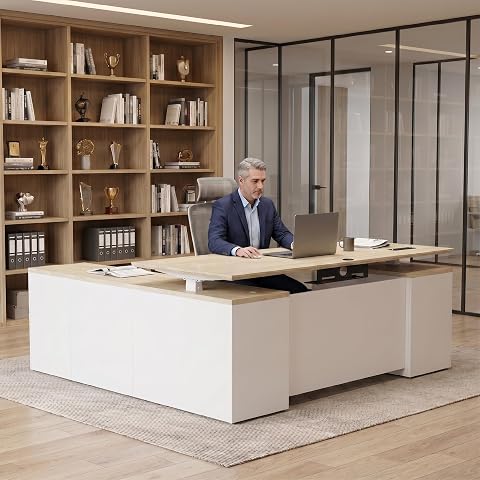
This 71-inch L-shaped standing desk features an electric height adjustment, built-in file cabinet, and integrated power outlets with USB ports, making it ideal for professional offices, schools, healthcare, and home use. Its spacious design and cable management system support a clean, ergonomic workspace.
Pros:
- Electric height adjustment for ergonomic comfort
- Built-in file cabinet and storage for organization
- Integrated power outlets and USB ports for device charging
- Spacious L-shaped design suitable for various office environments
Cons:
- Heavy at 220 pounds, may require assistance for setup
- Limited color options (Natural Wood & White)
- No mention of additional accessories or customization options
Best for: People whose room and workflow suit an L-shaped desk
Not ideal for: Anyone unable to verify dimensions or adjustment range
Bottom line: Confirm the full product details, footprint, and working heights before committing to an L-shaped setup.
Monitor Arm
Monitor positioning affects how you arrange your screen relative to your chair, keyboard, and desk. The HUANUO Dual Monitor Stand is listed for 13–40-inch monitors and includes USB and height adjustment in its name. Those details make compatibility checks especially important: confirm the size and weight limits for each display and whether your monitors use a supported mounting pattern.
A frequent mistake is checking screen size alone. Two monitors of the same diagonal measurement can differ in weight, thickness, and mounting hardware. Review the arm’s specifications for per-screen limits, VESA compatibility, clamp or grommet requirements, and desk thickness. Also check whether the desk surface has enough room for the base and whether the screens can move to the positions you need. Verify each monitor separately, including its cables and any attached accessories.
Consider the USB connection details rather than assuming the word “USB” means a particular charging or data capability. Check cable length, port placement, and what connection the arm requires. Before installation, plan the screen arrangement and confirm that the arm can reach it without obstructing other equipment. A dual arm works best when both display and desk requirements are clear.
What to look for:
- Supported screen sizes and per-monitor weight limits
- VESA pattern compatibility for each monitor
- Desk thickness and clamp or grommet requirements
- Arm reach and adjustment range for your layout
- USB port function and cable requirements
HUANUO Dual Monitor Stand for 13-40 inch Monitors with USB, Height Adjustable, V
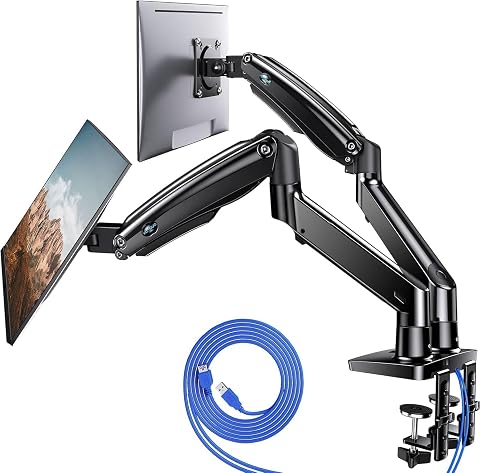
This dual monitor stand supports two screens from 13 to 40 inches, each weighing up to 26.4 lbs. It features adjustable height, full motion articulation, and built-in USB ports for convenient device charging, helping to free up desk space and improve ergonomics.
Pros:
- Supports large and heavy monitors up to 26.4 lbs each
- Full motion adjustment for optimal viewing angles
- Includes built-in USB ports for device charging
- Clutter-free workspace with cable management
Cons:
- May require a sturdy desk for secure mounting
- Limited to monitors within 13-40 inches range
- Some users may find installation complex
Best for: People setting up two compatible monitors
Not ideal for: Anyone whose displays or desk fall outside the stated limits
Bottom line: Match both monitors and the desk mount requirements to the arm specifications before installation.
Ergonomic Keyboard
A keyboard is one of the most-used parts of a developer’s workspace, so its shape and position deserve a careful fit check. The Logitech Ergo K860 Wireless Ergonomic Split Keyboard with Wrist Rest identifies a split layout and an included wrist rest. Consider whether that layout feels natural for your typing habits and whether you have enough desk depth to position it comfortably with your mouse.
A common mistake is choosing a split keyboard based on the ergonomic description alone. Check the keyboard’s dimensions, key layout, operating-system compatibility, and wireless connection requirements. Make sure the wrist rest does not force your hands into an uncomfortable position, and consider how the keyboard height relates to your chair and desk. Typing comfort is personal; if you are new to a split layout, allow time to adjust and confirm the return policy before buying.
For a development workflow, verify that the key arrangement supports the shortcuts and input habits you use regularly. Check whether the keyboard can switch between your devices if that matters to your setup, and confirm how it is powered. Position it so your shoulders can relax and your elbows remain close to your sides, then place the mouse within easy reach.
What to look for:
- Split layout and key arrangement suited to your typing habits
- Operating-system and wireless compatibility
- Keyboard dimensions and desk depth requirements
- Wrist rest height and placement
- Power and multi-device details relevant to your setup
Logitech Ergo K860 Wireless Ergonomic Split Keyboard with Wrist Rest

The Logitech Ergo K860 is an ergonomic wireless keyboard designed to promote a natural typing posture, reducing wrist and muscle strain. It features a split, curved keyframe, a pillowed wrist rest, adjustable palm lift, and quiet, full-size keys, making it suitable for comfortable, prolonged typing.
Pros:
- Reduces wrist bending and muscle strain
- Comfortable pillowed wrist rest with memory foam
- Adjustable tilt for personalized ergonomics
- Long battery life of two years
Cons:
- Higher price point compared to standard keyboards
- Requires setup for Bluetooth or USB receiver connection
Best for: People who want to try a split wireless keyboard layout
Not ideal for: Shoppers who need a compact keyboard or prefer a conventional layout
Bottom line: Check the layout, dimensions, and compatibility, then consider whether the wrist rest fits your posture.
Vertical Mouse
A vertical mouse changes how your hand approaches the pointing device, so comfort and control should guide the choice. Since this slot has no named product, compare candidates by hand size, grip preference, and the tasks you perform. Look for a shape that lets you reach the buttons without stretching and offers comfortable control through your usual workday.
A common mistake is choosing a mouse based on appearance or assuming one orientation suits everyone. Check the product’s size, handedness, button placement, connection type, and compatibility with your computer. If you rely on precise pointer movement, consider whether the sensor settings and software controls meet your needs. For a new grip style, a trial period can help you judge whether the shape works in real use.
Also account for desk space and how the mouse pairs with your keyboard. Keep it close enough to avoid reaching outward, and check that its controls are accessible without changing your grip awkwardly. Compare the return terms and setup requirements before selecting a specific model.
What to look for:
- Shape and size that suit your hand and grip
- Left- or right-hand orientation that matches your use
- Button placement and pointer controls
- Connection and computer compatibility
- Return terms that allow a real-world fit check
Footrest
A footrest can help complete a seated workstation when chair or desk height leaves your feet without comfortable support. The listed Step-to-Adjust Foot Rest with Infinite Height Adjustment emphasizes height flexibility. Check what its adjustment range actually is and whether the platform can be positioned to support your feet without pushing your knees or chair into an awkward position.
A common buying mistake is treating any footrest as a fix for a chair that is set too high or a desk that does not fit. First set your chair so you can sit comfortably and reach your work surface; then consider whether a footrest fills the remaining gap. Review the platform dimensions, stability, surface texture, and how the adjustment mechanism operates. Stable support matters if you plan to shift your feet during long work sessions.
Check whether the footrest fits under your desk and leaves room to move your feet. Confirm the adjustment steps or mechanism from the product details, since “infinite” in the name does not provide a specific range. If you use a standing desk, consider whether the footrest is intended for seated use and how it fits into your normal position changes.
What to look for:
- Actual minimum and maximum height range
- Platform size suited to your feet and desk space
- Stable construction and comfortable surface
- Adjustment mechanism that is easy to use
- Clear guidance on seated use and positioning
Step-to-Adjust Foot Rest with Infinite Height Adjustment
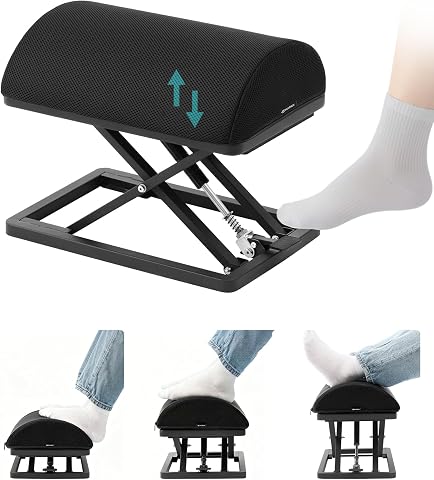
This carbon steel foot rest adjusts from 2.7 to 13.1 inches with a foot tap and has non-slip pads for stability. Its ergonomic high-density foam cushion has a removable, washable cover, and the foot rest arrives ready to use without assembly.
Pros:
- Adjusts height with a foot tap
- Sturdy carbon steel construction with non-slip pads
- Ergonomic foam cushion with washable cover
- Ready to use without assembly
Cons:
- Risk of finger entrapment during operation
- Heavy at 9.5 lb
Best for: People who need extra foot support at a seated desk
Not ideal for: Shoppers who cannot confirm the height range or platform size
Bottom line: Check the real adjustment range and under-desk fit to see whether this footrest suits your seated setup.
When buying in stages, start with the item that most affects your everyday posture and work area, then confirm desk and chair fit together. Next check monitor mounting and screen placement, followed by keyboard and mouse comfort. Add a footrest if your seated position needs it. This fit-first order helps you make each addition work with what you already use.
You do not need to change everything at once. Measure your workspace, verify product specifications, and adjust one part of your setup at a time. With a little attention to fit and compatibility, you can build a more comfortable workspace around the way you work.
Halloween Picks
halloween
As an affiliate, we earn on qualifying purchases.