

This checklist is for QA and development workspaces where computers, displays, and accessories can leave cords spread across a desk or floor. It covers practical ways to gather, route, and secure cables while keeping the setup accessible for changes.

Get business pricing on monitors, keyboards and dev gear
- Business-only prices and quantity discounts
- Tax-exempt purchasing
- Multiple users, one account, clear invoices
The sections are organized by cable-management role: a tray and box handle larger groups, while ties, clips, sleeves, and straps help organize individual runs or bundles. Each slot focuses on the named pick and the kind of setup it may suit.
Use the checklist by mapping your desk layout and cable paths first. Check dimensions, mounting surfaces, cable count, and whether you need to move or replace connections often. Then choose only the pieces that fit your workspace and routine.
Under-Desk Cable Tray
An under-desk tray is a place to gather cables and power accessories beneath the work surface, which can help keep the desk area easier to navigate. The Ascrono Original Under Desk Cable Management Tray is listed as black and 40.6 inches long, so compare that length with the clear space under your desk before choosing it. Consider where legs, drawers, crossbars, and other hardware sit, and plan how cords will reach the equipment above.
A common buying mistake is assuming any tray will fit any desk or that every cable can reach it without strain. Measure the usable mounting area and the routes from devices to the tray. Check the desk surface and the product’s mounting requirements before relying on a particular attachment method. If you use a standing desk, account for movement through its full range and leave enough slack for cables to travel without pulling. Keep access in mind: a densely packed or hard-to-reach tray can make troubleshooting and equipment changes more awkward, especially when connections need frequent attention.
What to look for:
- Confirm the 40.6-inch length fits the available underside space.
- Check desk construction and mounting compatibility.
- Map cable reach with enough slack for movement.
- Leave room to reach connections during troubleshooting.
- Account for legs, drawers, and crossbars.
Ascrono Original Under Desk Cable Management Tray, Black, 40.6 inches

This under desk cable management tray conceals cords, power strips, and adapters, keeping your workspace tidy and organized. Made from fire-retardant fabric, it supports up to 66 lbs and offers versatile mounting options for various desk setups.
Pros:
- Conceals cords and power strips for a tidy workspace
- Supports a large capacity for multiple devices
- Easy to install with versatile mounting options
Cons:
- Limited to a length of 40.6 inches, may not fit larger desks
- Fabric material may wear over time with heavy use
Best for: desks with enough clear underside space for a 40.6-inch tray
Not ideal for: desks with limited mounting room or frequently changing cable routes
Bottom line: Measure the usable underside and cable reach before choosing this tray.
Cable Management Box
A cable management box can gather loose cords into a more contained area near a desk or equipment cluster. The Extra-Large Wooden Cable Management Box with Magnetic Lid signals a larger format, wooden exterior, and magnetic lid; consider whether those details suit the location and the amount of cable clutter you want to group. Think through where it will sit and whether the lid will remain easy to open when you need to change a connection.
A frequent mistake is selecting a box based on appearance without checking its usable interior space or cable entry points. Compare the box dimensions with the power accessories and cable bundle you intend to place inside, and verify that cords can enter and exit without sharp bends or tension. Also consider how often you unplug or rearrange equipment: a tidy enclosure is less convenient if it blocks routine access. Plan for airflow and access around the equipment you place there, and follow product guidance for what can be enclosed. Measure the intended spot so the box does not interfere with foot space, drawers, or nearby devices.
What to look for:
- Check external and usable interior dimensions.
- Confirm cable entry and exit paths suit your setup.
- Make sure the lid remains accessible in its planned location.
- Allow cable slack and avoid tight bends.
- Follow product guidance for enclosed equipment and ventilation.
Extra-Large Wooden Cable Management Box with Magnetic Lid

This freestanding cable management box hides power strips and cords in home offices or living spaces. Made from solid acacia or beech wood, it has a magnetic lid and includes cable sleeves and clips.
Pros:
- Fits chargers of different heights, including standing MacBook chargers
- Solid wood construction offers a plastic-free option
- Includes cable sleeves and clips
- Magnetic lid helps keep the box securely closed
Cons:
- Listed for indoor use only
- Dimensions provided do not include the box height
Best for: workspaces that need a contained spot for a cable bundle
Not ideal for: setups requiring frequent access to connections inside the box
Bottom line: Check interior capacity, cable routing, and access before placing it.
Reusable Cable Ties
Reusable ties help keep a bundle together while allowing it to be opened again when equipment changes. The VELCRO Brand ONE-WRAP Cable Ties are listed as 8 inches by one-half inch, black, in a 100-pack. That format may be useful when organizing several separate bundles, but the right tie length depends on the bundle’s circumference and how much overlap you need for closure.
A common mistake is cinching a tie too tightly around cables or grouping cords that need to move independently. Measure a typical bundle, leave enough room to adjust it, and keep power and data leads arranged in a way that supports your workspace. Avoid using a tie to force an awkward bend or carry the weight of a cable run. Use ties as organizers, not as a substitute for routing or strain relief. Because they are reusable, consider where you may need to add or remove a cable later, and keep bundle labels or device ends visible where troubleshooting requires them. Check the listed width and length against your intended use before buying.
What to look for:
- Match the 8-inch length to bundle circumference and closure overlap.
- Use a loose fit that does not compress cables.
- Separate runs that need independent movement.
- Keep device ends accessible for troubleshooting.
- Choose bundle locations where ties can be reopened.
VELCRO Brand ONE-WRAP Cable Ties, 8in x 1/2in, Black, 100 Pack

These reusable VELCRO cable ties are designed for easy cord management, allowing you to bundle and organize wires quickly and securely. Suitable for indoor and outdoor use, they help eliminate clutter and tripping hazards while providing a damage-free, adjustable solution for home, office, or professional setups.
Pros:
- Reusable and adjustable for versatile use
- Easy to secure with pre-cut, slotted design
- Suitable for indoor and outdoor applications
- Effective for organizing multiple types of cables
Cons:
- May not be suitable for very heavy or large cables
- Limited to 8-inch length, less ideal for very long cords
Best for: bundles that may need regular cable additions or changes
Not ideal for: very large bundles that exceed the listed tie length
Bottom line: Check bundle size and leave enough slack before fastening.
Adhesive Cable Clips
Adhesive cable mounts can guide cords along a desk edge or another suitable surface. The XHF self-adhesive black cable zip tie mounts are listed as three-quarter inch, with 100 pieces and 8-inch zip ties. This combination can suit routing that uses tie mounts, but the dimensions and attachment surface should match the cables and the planned path.
A common buying mistake is assuming adhesive will hold on every surface or under every condition. Check the product’s surface guidance, prepare the mounting area as directed, and allow for the cable’s weight and direction of pull. Plan the route before placing mounts; changing their positions can be inconvenient, and closely spaced turns may stress cables. Measure the cable diameter and confirm it can be secured as intended by the included ties. Test placement thoughtfully in a low-impact area if the surface is delicate, and avoid blocking ports, vents, or moving desk parts. Leave enough access to release or replace a cable when debugging a setup.
What to look for:
- Verify surface compatibility and preparation instructions.
- Match the mount size to the intended cable and tie route.
- Plan spacing and turns before attaching mounts.
- Keep ports, vents, and moving parts clear.
- Allow access for cable replacement and troubleshooting.
XHF 3/4" Self-Adhesive Black Cable Zip Tie Mounts, 100 pcs with 8" Zip Ties, Scr
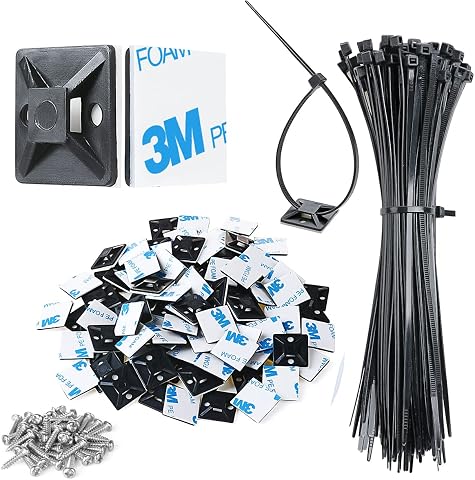
These high-quality adhesive zip tie mounts are made from durable PA66 nylon and 3M strong adhesive, suitable for outdoor use. They are ideal for managing various cables such as computer, TV, and holiday lights, providing a secure and organized solution without tools.
Pros:
- Durable and weather-resistant for outdoor use
- Easy to install with adhesive backing and screws
- Includes comprehensive set of mounts, ties, and screws
Cons:
- Adhesive may require 24 hours to fully cure
- Not reusable once adhered
- Surface must be clean for optimal adhesion
Best for: fixed cable paths along compatible desk surfaces
Not ideal for: surfaces where adhesive suitability or cable pull is uncertain
Bottom line: Check surface guidance and route layout before attaching the mounts.
Cable Sleeves
A cable sleeve can gather multiple cords into a more unified run between a desk and connected equipment. The supplied pick is named DeskShow 60 x 30 Inch Electric Standing Desk with Flip-Top Cable Manag. That name describes a standing desk and mentions flip-top cable management, rather than clearly identifying a standalone sleeve. Confirm the complete product listing and what is included before treating it as a sleeve or comparing it with cable sleeves.
For any sleeve or integrated desk cable-management feature, check the length and capacity against your actual cable path and bundle. A standing desk needs enough slack for its full range of motion, and a bundle should not be so tight that individual leads are pulled when the surface moves. Consider whether you need to add or remove cords often; an enclosing solution can complicate those changes if access is limited. Verify the product identity first, then review dimensions, compatibility, and routing details. Do not assume a desk listing includes a separate sleeve or that a flip-top feature will accommodate your cable bundle without checking the product information.
What to look for:
- Confirm the complete product name and included components.
- Check whether the item is a desk feature or a standalone sleeve.
- Match routing length and capacity to the cable bundle.
- Allow slack through the standing desk’s full movement range.
- Consider access for adding and removing cables.
DeskShow 60 x 30 Inch Electric Standing Desk with Flip-Top Cable Management
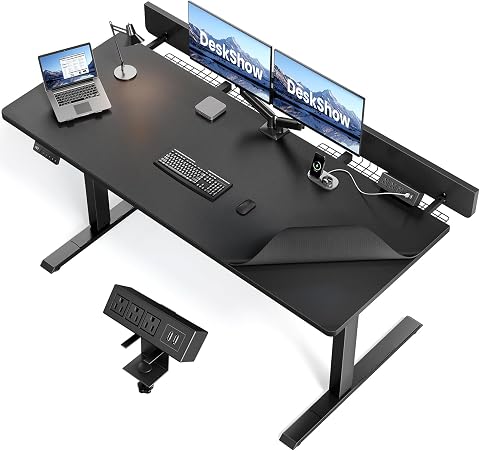
This electric standing desk has a 60 x 30 inch adjustable desktop, dual-beam steel frame, and flip-top cable panel with two storage baskets. It adjusts from 27.7 to 45.5 inches with three memory presets and includes a desk pad and clamp-on power strip.
Pros:
- Adjustable height with three memory presets
- Flip-top cable access and two storage baskets help keep cables organized
- Dual-beam frame and four support rods are designed for stability
- Desk pad and clamp-on power strip are included
Cons:
- Weighs 78 pounds
- Maximum supported load is 250 pounds
Best for: buyers confirming an integrated desk feature for cable routing
Not ideal for: anyone seeking a clearly specified standalone cable sleeve
Bottom line: Confirm the full listing and included cable-management parts before buying.
Velcro Cable Straps
Straps can bundle longer cords or keep them grouped for storage and handling. The VELCRO Brand Easy Hang Extension Cord Holder Straps Variety Pack is identified as a variety pack, with the color description truncated to “Blac.” Consider whether your need is hanging extension cords, organizing cables at a workstation, or both; the product name alone does not establish which sizes are included or how they attach.
A common mistake is choosing a holder strap without checking the bundle size, attachment method, and intended use. Review the full product details to learn the dimensions and quantity of each strap, then compare them with the cords you plan to gather. If you intend to hang a bundle, check what the strap is designed to support and where it can attach; do not assume a cable strap provides a mounting point. For desk use, keep bundles accessible and avoid suspending cords where they could be pulled or snagged. Match strap to task: a storage-oriented holder may not be the best fit for a permanent routed cable run. Confirm color and pack details if those matter to your workspace.
What to look for:
- Review the full listing for sizes and quantities in the variety pack.
- Match strap capacity to the cord bundle.
- Confirm the attachment method and intended use.
- Check the planned hanging point and cable path.
- Keep desk bundles accessible and clear of snag points.
VELCRO Brand Easy Hang Extension Cord Holder Straps Variety Pack, Black

These heavy-duty VELCRO extension cord straps are designed for organizing long cords, hoses, and tools in garages, sheds, and RVs. Made from durable ballistic nylon with rust-resistant grommets, they provide a simple, effective way to keep outdoor and workshop spaces tidy and organized.
Pros:
- Heavy-duty and durable for long-term use
- Easy to open and release with red pull tabs
- Suitable for various applications including garage, shed, and RV storage
- Rust-resistant grommet for outdoor use
Cons:
- Limited to organizing cords and hoses, not for heavy tools
- Requires hooks or wall space for hanging
- May not fit very thick or bulky cords
Best for: grouping extension cords for handling or storage
Not ideal for: permanent desk routing without a suitable attachment point
Bottom line: Check strap dimensions and intended use against your cable task.
Start with the largest routing needs: measure for an under-desk tray or box, then map each cable path. Add clips where you need a guided route, and choose ties, sleeves, or straps for bundles that suit their listed dimensions and use. Confirm product details when a name is incomplete or does not clearly match the checklist slot.
A little measuring and planning can make a workspace easier to maintain as devices change. Choose the pieces that fit your desk, cable paths, and troubleshooting habits, and build the setup one section at a time.
Evergreen bestsellers Picks

Breville Bambino Espresso Machine, Brushed Stainless Steel

Sony WH-1000XM6 Wireless Noise-Canceling Over-Ear Headphones, Blue, Bundle

Roborock Robot Vacuum and Mop with LiDAR Navigation and 10,000 Pa Suction
As an affiliate, we earn on qualifying purchases.