

Welcome to our 2026 QA & Development Gear Checklist, tailored specifically for professionals in software development and quality assurance. Whether you’re setting up a new workspace or upgrading your current gear, this guide is designed to help you make smart, informed choices to optimize productivity and comfort. Each section covers essential tools, from laptops to networking equipment, ensuring you get the most out of your investment.

Get business pricing on monitors, keyboards and dev gear
- Business-only prices and quantity discounts
- Tax-exempt purchasing
- Multiple users, one account, clear invoices
This article is organized into distinct categories, each focusing on a critical aspect of your tech setup. You’ll find detailed insights into what to consider when selecting each item, along with practical advice on sizing, compatibility, and common pitfalls. Use this checklist as a reference guide to evaluate your needs and make confident purchasing decisions.
To get the most value, start by identifying your primary work tasks and workspace constraints. Then, review each section to see which items align with your workflow. Remember, a well-rounded setup not only boosts efficiency but also enhances your overall work experience. Happy shopping!
Coding Laptops
Your coding laptop is the backbone of your development environment. The HP OmniBook 16 2K Touch Laptop is a versatile choice, offering a high-resolution display and powerful specs like 16GB RAM and a 512GB SSD. When choosing a laptop for coding, focus on performance, portability, and display quality. A good keyboard and reliable battery life are also key for long coding sessions. Avoid models with limited RAM or slow processors, which can hinder productivity. Compatibility with your preferred development tools and operating systems is essential, so double-check hardware requirements before purchasing. Consider your typical work environment—whether you’re working remotely or in an office—and select a machine that fits your mobility needs.
Size and weight matter, especially if you travel frequently or work in different locations. The 16-inch screen strikes a good balance between screen real estate and portability. Ensure the laptop has enough ports for your peripherals, like external monitors or docking stations. A sturdy build quality will also extend the lifespan of your device, keeping you productive for years to come.
What to look for:
- High-resolution display (at least 2K or higher)
- At least 16GB RAM
- Solid-state drive (SSD) for speed
- Reliable battery life
- Good keyboard and build quality
HP OmniBook 16" 2K Touch Laptop, Intel Ultra 7 255U, 16GB RAM, 512GB SSD

The HP OmniBook 16-inch laptop features a 2K touchscreen display, Intel Ultra 7 processor, 16GB DDR5 RAM, and a 512GB PCIe NVMe SSD, offering powerful performance and vibrant visuals. Designed for productivity and creative tasks, it includes advanced AI features, high-speed connectivity, and a sleek, portable design.
Pros:
- Vivid 2K touchscreen display with 120Hz refresh rate
- Powerful Intel Ultra 7 processor with AI acceleration
- High-speed 16GB DDR5 RAM and fast 512GB SSD
- Sleek, portable design with professional aesthetics
Cons:
- Limited physical security features (no fingerprint sensor)
- Relatively lightweight build may impact durability
- Battery life details not specified
Best for: Powerful, portable coding
Not ideal for: Limited RAM or slow processor
Bottom line: Choose a laptop that balances performance, portability, and display quality for seamless coding.
Testing Devices
Testing devices like the TD2e Acoustic Imaging Camera with 64 MEMS Microphones and a 5MP Touch Screen are vital for QA professionals focusing on hardware testing and environmental analysis. These specialized tools help you identify issues that are not visible to the naked eye, such as acoustic anomalies or micro-vibrations. When selecting testing equipment, consider compatibility with your testing environment and the specific features you need. Avoid overspending on features that won’t be used daily; instead, prioritize durability and precision. Proper calibration and ease of use are also crucial, especially if multiple team members will operate the device.
Ensure the testing equipment integrates seamlessly with your existing workflow. For example, touch-screen interfaces should be responsive, and the device should support data export for analysis. Think about your typical testing scenarios—whether in a lab, on-site, or remote—to determine the best fit. Investing in reliable, high-quality testing devices can save time and improve the accuracy of your QA processes.
What to look for:
- High sensitivity microphones
- Clear, responsive touch screen
- Compatibility with testing software
- Durability and ease of calibration
- Support for data export
TD2e Acoustic Imaging Camera with 64 MEMS Microphones and 5MP Touch Screen

The TD2e acoustic imaging camera utilizes a high-density MEMS microphone array and advanced beamforming to detect audible and ultrasonic leaks, vibrations, and noise sources in various environments. Its portable design features a high-resolution touchscreen, rugged build, and versatile imaging modes, making it ideal for industrial, automotive, and home applications.
Pros:
- High-sensitivity MEMS microphone array for detecting audible and ultrasonic sounds
- Portable with durable, rugged design and high-resolution touchscreen
- Versatile imaging modes for comprehensive leak and vibration detection
- Effective in noisy industrial environments
Cons:
- Relatively heavy at 1.72 pounds for handheld use
- Complex features may require training for optimal use
- Price range not specified
Best for: Environmental and acoustic analysis
Not ideal for: Basic testing needs or low sensitivity
Bottom line: Select testing devices that provide precision and durability for thorough QA.
Code Editors
An effective code editor is essential for smooth development workflows. The book, Software Engineering Made Easy: A Comprehensive Reference Guide for Wr, emphasizes the importance of choosing tools that enhance productivity and reduce errors. Look for editors that support your preferred programming languages and offer features like syntax highlighting, auto-completion, and debugging integrations. Avoid overly complex editors that can cause distractions; instead, opt for those that streamline your coding process. Compatibility with your operating system and plugins/extensions for customization are also important considerations. An editor that aligns with your workflow can significantly reduce development time and improve code quality.
When selecting a code editor, consider your team’s collaboration needs—some editors support real-time sharing or version control integrations. Additionally, check the editor’s performance with large codebases to avoid lag and crashes. The right editor should feel intuitive and customizable, enabling you to focus on writing code rather than battling the interface. Remember, the best editor is one that fits your specific development style and project requirements, so don’t be afraid to try a few options before settling on your favorite.
What to look for:
- Language support
- Intuitive interface
- Syntax highlighting and auto-completion
- Debugging and version control integrations
- Customizability and plugin support
Software Engineering Made Easy: A Comprehensive Reference Guide for Writing Good

This book provides a comprehensive overview of software engineering principles, focusing on writing efficient and maintainable code. It serves as a valuable reference for both beginners and experienced developers looking to improve their coding practices.
Pros:
- Comprehensive coverage of software engineering principles
- Useful reference for developers of all levels
- Focuses on writing efficient and maintainable code
Cons:
- Lacks detailed examples or practical exercises
- May be too broad for those seeking specialized topics
Best for: Streamlined development workflows
Not ideal for: Limited language support or poor performance
Bottom line: Choose a code editor that boosts productivity and matches your workflow.
Development Monitors
High-quality monitors like the Dell Optiplex Tiny Mini Desktop PC with Dual 27-Inch Curved Monitors are crucial for a comfortable and efficient development environment. Dual monitors expand your workspace, allowing you to view multiple files or applications simultaneously, which can significantly boost productivity. When choosing monitors, focus on resolution, refresh rate, and ergonomic features like adjustable stands and anti-glare coatings. Curved screens reduce eye strain during long coding sessions, enhancing overall comfort. Compatibility with your desktop setup and the ability to support multiple inputs are also key factors. Avoid monitors with poor color accuracy or low resolution, as they can cause eye fatigue and hinder detailed work.
Size matters—27 inches is a popular choice for balancing workspace and desk space. Ensure your graphics card or desktop can support dual 4K or high-resolution displays without lag. Ergonomic features like height adjustment, tilt, and swivel are essential for maintaining good posture. Investing in high-quality monitors is a smart move for developers who spend hours in front of the screen, helping to reduce fatigue and improve focus over long periods.
What to look for:
- High resolution (at least 1080p, ideally 4K)
- Ergonomic adjustability
- Curved screens for reduced eye strain
- Multiple input options
- Vivid color accuracy
Dell Optiplex Tiny Mini Desktop PC with Dual 27-Inch Curved Monitors, 32GB RAM,

This compact Dell Optiplex Tiny Mini Desktop PC features a Core i5 processor, 32GB RAM, and a 1TB SSD, providing reliable and efficient performance for work, entertainment, or creative tasks. It includes dual 27-inch curved monitors and accessories such as an RGB keyboard, mouse, soundbar, and webcam for a complete, stylish setup.
Pros:
- Powerful performance with 32GB RAM and Core i5 processor
- Includes dual large curved monitors for immersive viewing
- Complete setup with RGB keyboard, mouse, soundbar, and webcam
Cons:
- Renewed product may have limited warranty
- Large monitors may require ample desk space
- Pre-installed Windows 11 Pro may need updates
Best for: Extended coding sessions
Not ideal for: Limited screen real estate or poor ergonomics
Bottom line: Opt for dual, high-resolution monitors to maximize workspace and comfort.
Networking Equipment
The MikroTik Cloud Core Router CCR2216-1G-12XS-2XQ is a robust networking device perfect for supporting a high-performance development and testing environment. Reliable networking hardware ensures fast, stable connections across all your devices, which is essential for remote collaboration, cloud access, and data transfers. When selecting routers, look for features like high throughput, multiple gigabit ports, and advanced security options. Avoid routers that lack sufficient port options or have limited bandwidth capabilities, as they can bottleneck your workflow and cause frustration during large data transfers or video conferencing.
Compatibility with your network setup and ease of configuration are also important. The CCR2216-1G-12XS-2XQ offers advanced features suitable for demanding environments, but make sure it fits your specific needs—whether for small teams or larger setups. A stable, high-speed network reduces downtime and keeps your projects moving smoothly, especially when working with cloud-based tools or remote teams.
What to look for:
- High throughput and multi-gigabit ports
- Advanced security features
- Ease of configuration
- Compatibility with existing network infrastructure
- Support for VPN and remote access
MikroTik Cloud Core Router CCR2216-1G-12XS-2XQ

The MikroTik Cloud Core Router CCR2216-1G-12XS-2XQ is a high-performance router featuring 12x 10G SFP+ ports and 2x 25G QSFP+ ports, along with Gigabit Ethernet. It includes 16GB of RAM and runs RouterOS Level 6.
Pros:
- 16GB of RAM for handling heavy workloads
- 12x 10G SFP+ and 2x 25G QSFP+ ports for high-throughput networking
- RouterOS Level 6 license included
Cons:
- Detailed product information was not available from the listing
Best for: High-performance development environments
Not ideal for: Limited bandwidth or basic features
Bottom line: Invest in a reliable router to ensure seamless connectivity for your team.
Cloud Storage
The UGREEN NAS DXP8800 Plus 8-Bay Business NAS provides ample storage capacity and data management features essential for development teams handling large projects and backups. Network-attached storage (NAS) allows for centralized data access, making collaboration easier and more secure. When choosing a NAS, consider the number of bays, supported RAID configurations, and compatibility with your existing network. Avoid models with limited expandability or slow data transfer speeds, as these can hinder your workflow. An 8-bay NAS offers flexibility for expanding storage as your projects grow, ensuring you always have enough space without sacrificing performance.
Additionally, look for features like remote access, user management, and data encryption to keep your files secure. Compatibility with various operating systems and backup software ensures seamless integration into your existing environment. A reliable NAS setup minimizes downtime and data loss, making it a smart investment for any development team managing critical data and version control repositories.
What to look for:
- Multiple drive bays (at least 8)
- Support for RAID configurations
- Fast data transfer speeds
- Remote access capabilities
- Strong security features
UGREEN NAS DXP8800 Plus 8-Bay Business NAS
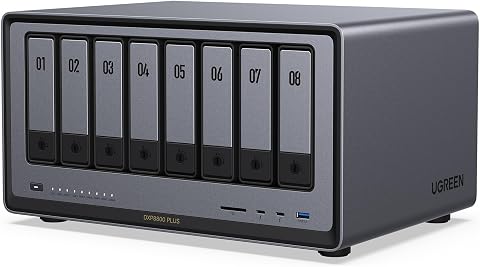
The UGREEN NAS DXP8800 Plus is an enterprise-grade 8-bay network-attached storage device designed for demanding businesses, offering high performance, massive storage capacity up to 272TB, and dual 10GbE network ports for fast data transfer. It features a powerful 12th Gen Intel Core i5 processor, comprehensive security, and broad device compatibility, making it suitable for large studios, IT team
Pros:
- High-performance with a powerful Intel Core i5 processor
- Massive storage capacity up to 272TB with flexible RAID options
- Fast data transfer speeds with dual 10GbE ports
- Broad device compatibility and comprehensive security features
Cons:
- Hard drives are not included and must be purchased separately
- Supports wired Ethernet only, no Wi-Fi connectivity
- Complex setup may require technical expertise
Best for: Team collaboration and backups
Not ideal for: Limited storage expandability or slow speeds
Bottom line: Choose a NAS that offers scalability and security for your data needs.
Starting your shopping with a clear budget and priority list will make your decision-making process much smoother. Focus on the essential features that directly impact your workflow and choose reputable brands known for reliability and performance. Remember, investing in quality gear now can save you time and frustration later.
We hope this checklist empowers you to make confident, informed choices for your QA and development setup. Happy shopping, and here’s to a more productive 2026!
Halloween Picks
halloween
As an affiliate, we earn on qualifying purchases.